Beat ATS in 2026: Formatting & Keyword Rules That Get You Hired
Learn the exact ATS formatting and keyword rules that get resumes ranked — not buried — in 2026. Practical, research-backed tactics for every job seeker.
Beat ATS in 2026: Formatting & keyword rules that get you hired
Your resume could be perfect on paper and still never reach a human being. In 2026, that's happening to the majority of applicants.
Applicant Tracking Systems screen candidates before any recruiter lays eyes on a single line of your experience. If your resume doesn't parse cleanly or align with the right keywords, it gets buried. Being ranked #150 out of 180 applicants is functionally the same as being rejected. This guide covers exactly what ATS systems look for, which formatting choices kill your chances before a human ever reads your resume, and how to optimize your keywords the right way, without stuffing or gimmicks. Read it once, apply it to your next application, and you'll be competing on a completely different level.
Why ATS screening is a bigger problem than ever in 2026
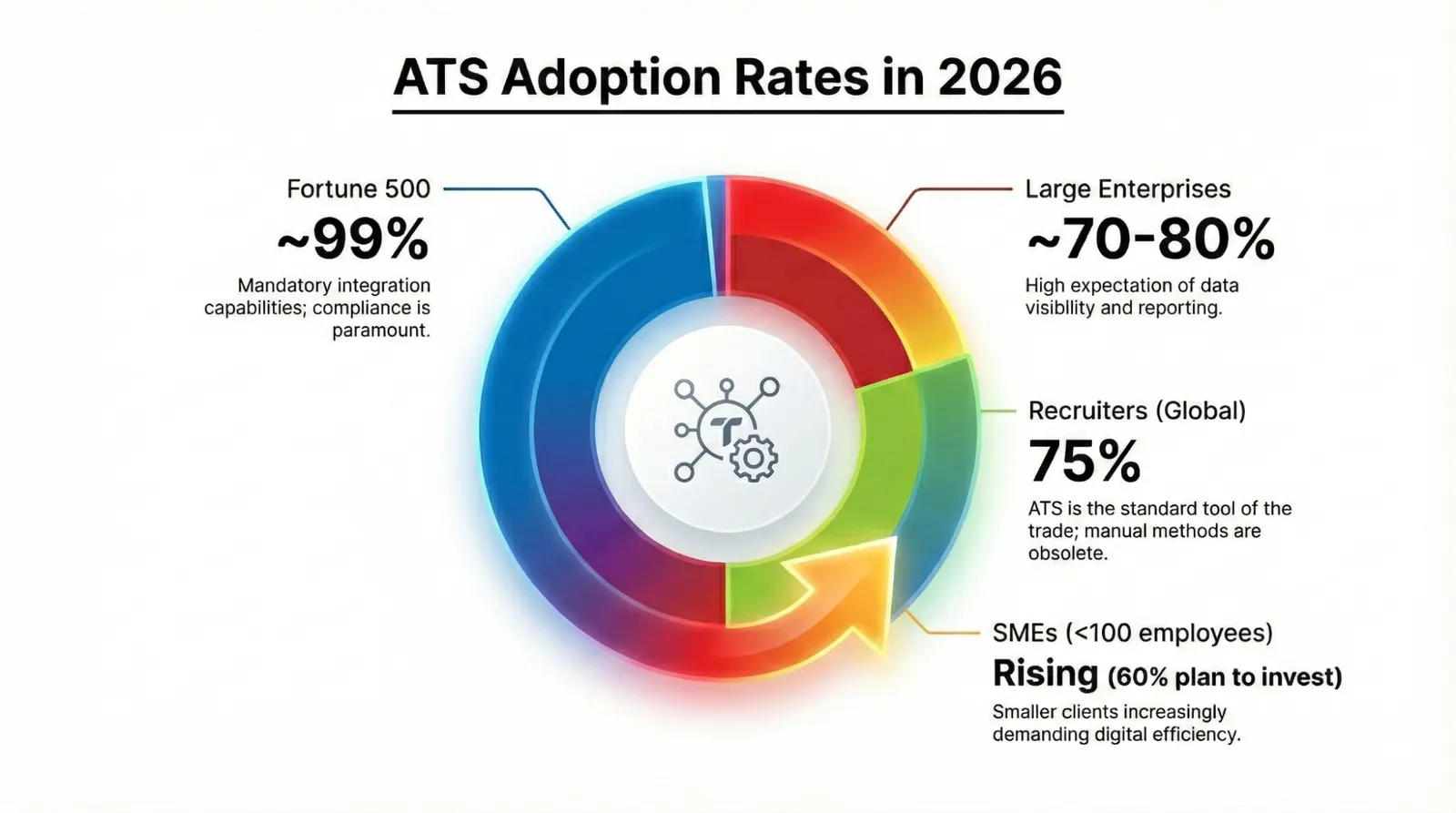
ATS adoption has stopped being a "big company" issue. Jobscan's tracking shows that 97.8% of Fortune 500 companies run ATS on their career pages. More importantly, 60% of small businesses with as few as one to fifty employees are using these systems too, meaning you can no longer assume a smaller employer means a human reads your resume first.
The market behind these tools is growing fast. The global ATS market is projected to hit USD 18.57 billion in 2026, on its way to USD 34.83 billion by 2034. And the platforms are getting smarter: 67% of large companies now use AI-assisted resume screening inside their ATS, according to SHRM's 2025 data. These aren't just keyword-matching engines anymore. They're ranking engines augmented by machine learning.
Here's where it gets costly: 88% of employers believe their ATS is screening out highly qualified candidates simply because those candidates aren't submitting resumes optimized for the system. That's not a minor inefficiency. It's a systemic problem that hands an advantage to anyone willing to learn the rules.
A few grounding stats before we get tactical:
- The median ATS score for a first-submission resume is just 48 out of 100 (ResumeAdapter, Q1 2026)
- The median candidate covers only 41% of required job-description keywords on first submission (Jobscan, 2025 analysis of 1.2M+ resumes)
- Proper ATS optimization lifts scores by an average of 17 points, enough to move from invisible to shortlisted
How ATS actually works (so you can beat it)
Before you can optimize, you need to understand what you're actually optimizing for. ATS doesn't auto-reject your resume. It ranks it.
A 2025 study of 25 US recruiters across 10+ ATS platforms found that 92% do not configure automatic rejection rules based on resume content. What actually blocks candidates before a human review are knockout questions: hard requirements like work authorization or a minimum years of experience set by the employer, not the algorithm itself.
So what does the ATS actually do? It parses your resume, extracting structured data like your name, contact details, job titles, dates, and skills, and drops that information into searchable database fields. The recruiter then searches those fields for terms like "project manager" or "Salesforce." If your resume parsed cleanly and your language matches what they're searching, you appear at the top. If it didn't parse correctly, you're invisible regardless of your actual qualifications.
The real failure mode is parsing, not rejection. Resumes with tables, columns, and graphics cause 23% of parsing failures. And when 180 people apply and the recruiter reviews the top 20, being ranked 150th is a dead end even if you're the most qualified candidate in the pool.
The formatting rules that keep you in the game
1. Use a single-column layout, always
Multi-column resumes look polished to human eyes. To an ATS, they're a disaster. These systems read text linearly, left to right, top to bottom, and cannot distinguish between columns. A designer-style resume with a sidebar on the left and content on the right gets parsed like this: the parser walks down the sidebar first, then the body, jumbling your job history with your skills and contact info.
The data backs this up. Single-column layouts achieve 93% parsing accuracy versus 86% for two-column layouts, based on EDLIGO's 2025 analysis of 1,000 rejected resumes across Workday, Taleo, and Greenhouse. Save the design-forward layout for your portfolio or a printed copy you hand to someone in person.
2. Eliminate tables, text boxes, and graphics
Most ATS platforms cannot reliably read tables. When your resume contains one, the parser may scramble cell contents, read them out of order, or skip the data entirely. This includes simple two-column tables that many people use to list skills side by side. They look clean, but they create parsing chaos.
The same applies to text boxes (often used for callout stats or design accents) and any embedded graphics. Studies show resumes with these elements lose 50% or more of their content when parsed. Replace every table with plain-text bullet lists. Replace text boxes with a simple paragraph or bolded line. Strip graphics entirely from your ATS submission copy.
3. Submit as DOCX, not PDF
This one surprises people. PDF feels more polished, more permanent, but a plain DOCX file has only a 4% ATS parsing failure rate compared to 18% for PDF files. That's a four-and-a-half-times higher failure rate just from choosing the wrong file format.
The reason: PDFs encode text as a visual layer, and many ATS parsers struggle to extract it cleanly, especially from PDFs created by design tools like Canva or Adobe InDesign. Unless a job posting specifically requests a PDF, submit DOCX. Keep a PDF version on hand for emailing directly to a recruiter or uploading to a company's "additional documents" field.
4. Keep contact info in the body, not the header
It feels natural to put your name and contact details in the document header. Don't. Many ATS systems only scan the main body of the document and skip headers and footers entirely. Your phone number, email, and LinkedIn URL could be completely invisible to the parser. Move all contact information into the first few lines of the document body.
5. Use standard section headings
ATS systems are trained to recognize conventional section labels. When you rename sections creatively ("My Journey" instead of "Work Experience," or "What I Bring" instead of "Skills"), the parser often can't categorize the content correctly. Stick to: Work Experience, Education, Skills, Certifications, and Summary. Boring? Maybe. Effective? Absolutely.
6. Choose clean, standard fonts
Fancy or unusual fonts can render incorrectly when processed by ATS software, sometimes converting characters to symbols or question marks. Safe choices include Calibri, Arial, Garamond, Georgia, and Times New Roman. Keep your body font between 10-12pt and section headings between 12-14pt. Avoid anything decorative.
The keyword rules that move you up the rankings
7. Mirror the job description precisely
ATS systems compare your resume against the specific job posting. The closer your language mirrors the posting's exact terminology, the higher your match score. This doesn't mean copy-pasting. It means using the same words and phrases the employer used when they matter.
If the job posting says "stakeholder management," your resume should say "stakeholder management," not "managing relationships with key stakeholders." Synonyms don't always register. Exact phrase matching is what the ATS is optimizing for.
Practical method: paste the job description into a word frequency tool, or read it carefully and highlight every skill, tool, and responsibility mentioned more than once. Those are your priority keywords. Weave them naturally into your bullet points and summary.
8. Front-load your most important keywords
ATS systems (and the recruiters searching them) weight keywords that appear early and in prominent sections more heavily. Your professional summary (two to four sentences at the top) is prime real estate. Use it to name your core role, your strongest competencies, and one measurable result. This section gets read first by both the machine and the human.
Weak summary: "Experienced professional with a background in marketing and communications looking for new opportunities."
Strong summary: "Digital marketing manager with 7 years driving B2B pipeline growth. Skilled in SEO, HubSpot, and paid media strategy. Led a campaign that reduced cost-per-lead by 34% across three enterprise accounts."
The strong version gives the ATS five distinct keywords to match and gives the recruiter a reason to keep reading.
9. Build a dedicated skills section
Many ATS platforms have a structured skills field that recruiters filter by directly. A dedicated Skills section, a clean bulleted list of your hard skills, tools, platforms, and methodologies, ensures these terms are captured even if they don't appear prominently elsewhere in your resume.
List technical tools by their proper names (e.g., "Salesforce CRM," "Microsoft Power BI," "Google Analytics 4"). Abbreviations and full terms both matter, so include both where natural, since different recruiters search differently. For example: "Search Engine Optimization (SEO)" covers both.
10. Quantify bullets, but lead with the keyword
A common mistake is leading a bullet with the metric and burying the skill. ATS systems scan for keywords first. Lead with the function or skill, then follow with the number.
ATS-weak: "34% reduction achieved in customer churn through a new onboarding process."
ATS-strong: "Reduced customer churn by 34% by redesigning the onboarding workflow for 1,200+ enterprise accounts."
The strong version leads with the verb and the function ("Reduced customer churn"), which is what the ATS is looking for, and the human reward (the specific result and scale) follows immediately.
Common ATS mistakes to stop making right now
Using a "creative" or design-heavy template. Those beautiful Canva resume templates are built for human eyes, not parsers. If it has columns, icons, color-coded sections, or infographic-style skill bars, it will likely fail ATS parsing. Save it for freelance or creative roles where you're submitting directly to a person.
Listing skills without context. A keyword in your skills section alone scores lower than a keyword appearing in both your skills section and embedded naturally in your work experience bullets. Depth of keyword coverage matters. Surface it in multiple places.
Using images or logos of employers. Some resume designs include company logos or headshots. Strip them. ATS systems cannot parse images. They just see a blank space or an error.
Tailoring nothing. Sending the same resume to every application is the single biggest ATS mistake. The job description is your cheat sheet. Spend 10-15 minutes per application adjusting your summary and top three bullets to reflect the specific role's language and requirements.
Ignoring the job title. If the posting says "Senior Data Analyst" and your internal title was "Analytics Lead II," lead with "Senior Data Analyst" in your summary (framing your function, not your formal title) and make sure it appears in your narrative. The recruiter is likely searching that exact title.
Putting important info in headers, footers, or text boxes. As covered above, this content is frequently skipped by the parser entirely. If it's worth including, it belongs in the main body.
Tools you can use right now
These platforms help you check your resume's ATS compatibility and keyword alignment before you submit:
| Tool | What It Does | Best For |
|---|---|---|
| Jobscan | Compares your resume to a job posting and scores keyword match; flags formatting issues | Keyword gap analysis |
| ResumeWorded | ATS score + line-by-line feedback on phrasing and impact | Overall resume quality check |
| SkillSyncer | Extracts keywords from job postings and shows what's missing from your resume | Fast tailoring for multiple applications |
| Teal HQ | Job tracker + resume builder with built-in ATS optimization | Full job search management |
| Grammarly (Business) | Catches phrasing issues that weaken impact | Polishing language before submission |
Most of these tools offer a free tier sufficient to run several resume checks per week. Start with Jobscan or ResumeWorded to get your baseline score, then use the gap report to guide your edits.
Adapting this advice for your situation
Career changers
Your biggest challenge is that your past job titles won't match the target role's keywords. Lean hard into your transferable skills, but use the destination role's language, not your previous industry's terminology. If you're moving from teaching to instructional design, don't just say "developed lesson plans." Say "designed and delivered curriculum for 30+ learners using blended learning methodologies." Your summary section is especially important here. Use it to bridge your background explicitly and front-load the keywords of your new field.
Entry-level and recent graduates
You may not have much work experience, but ATS systems also scan education, certifications, projects, and extracurricular roles. List relevant coursework, tools you've used in academic projects, and any internships or volunteer roles using the same keyword discipline. If a job posting lists "Python" as a required skill and you used it in a university project, it still counts. Name it explicitly.
International applicants
If you're applying for roles in a different country, research whether the role's terminology differs by market. "CV" vs. "resume," "postcode" vs. "zip code," and regional spelling conventions (e.g., "optimise" vs. "optimize") can affect parsing in systems calibrated for specific markets. Also confirm your work authorization status is addressed clearly, since knockout questions around eligibility are often the actual hard filter, not your resume content.
Your ATS optimization checklist
Use this before you submit any application:
- Resume is in a single-column layout with no sidebars
- File is saved and submitted as .DOCX (unless PDF is explicitly requested)
- No tables, text boxes, graphics, or images in the document
- Contact information is in the document body, not the header or footer
- Section headings use standard labels (Work Experience, Education, Skills, etc.)
- Font is clean and standard (Calibri, Arial, Georgia, etc.), body 10-12pt
- Professional summary includes your target job title and 2-3 core keywords
- Job description has been read carefully and priority keywords identified
- Keywords from the job posting appear in both your Skills section and experience bullets
- Bullet points lead with a keyword or strong verb, followed by a quantified result
- Resume has been run through a tool like Jobscan or ResumeWorded for a match score
- Resume has been tailored to this specific posting, not sent as a generic version
Frequently asked questions
Does ATS actually reject my resume automatically? Not usually. A 2025 study of 25 recruiters across 10+ ATS platforms found that 92% don't configure automatic rejection rules based on resume content. The real risk is ranking: a low-scoring resume simply never rises high enough for a recruiter to click on it. Hard knockout filters (like work authorization) are set by employers, not the ATS algorithm itself.
Should I always submit my resume as a DOCX file? In most cases, yes. DOCX has a 4% ATS parsing failure rate compared to 18% for PDF, according to EDLIGO's 2025 analysis. The exception: if a job posting explicitly asks for a PDF, or if you're emailing a resume directly to a recruiter who didn't request DOCX. Keep both versions on hand.
How many keywords should I include on my resume? There's no magic number. Depth and relevance matter more than quantity. Focus on covering the keywords that appear multiple times in the job description, especially in the requirements section. Aim for your resume to naturally reflect 70-80% of the job description's key terms. Anything less (the median is 41%) leaves you ranked below candidates who've done their homework.
Can I use the same resume for every application? You can use the same base resume, but you should tailor the summary and top bullet points for each application, minimum 10-15 minutes of targeted editing. ATS match scores drop significantly when your language doesn't mirror the specific posting. The tailoring doesn't need to be a full rewrite. Even swapping three to five key phrases can meaningfully lift your ranking.
Do ATS systems read LinkedIn profiles? Some platforms, like Workday, allow candidates to import their LinkedIn profile, and some recruiters search LinkedIn separately, but LinkedIn is not parsed the same way as a submitted resume file. Treat your resume and LinkedIn profile as complementary, not identical. Your resume is optimized for a specific job description; your LinkedIn profile is optimized for general discoverability.
Beating ATS in 2026 isn't about gaming the system. It's about communicating clearly in the language these tools are built to understand. Fix your formatting so your resume parses correctly, mirror the job description's keywords so you rank for what the recruiter is searching, and tailor every submission to the specific role. Do those three things consistently and you'll move from invisible to shortlisted. Start with your current resume, run it through Jobscan or ResumeWorded, and let the gap report show you exactly what to fix first.
Editor's Picks
 News
News 57,000 Jobs Added: How to Get Hired in the 2026 Slowdown
Jul 10, 2026
 Interviews
 Ace Your AI Video Interview in 2026: HireVue Tips & Prep Guide
Jul 10, 2026
 Resume
 Beat AI-Powered ATS in 2026: What Your Resume Must Do Now
Jul 10, 2026
 Skills
 Best AI Skills to Put on Your Resume in 2026 (Get Hired Fast)
Jul 10, 2026